

Setting Up and Configuring Two-Factor Authentication
To set up two-factor authentication (2FA) on your account, follow these steps:
1. Go to the "Settings" section of your account.
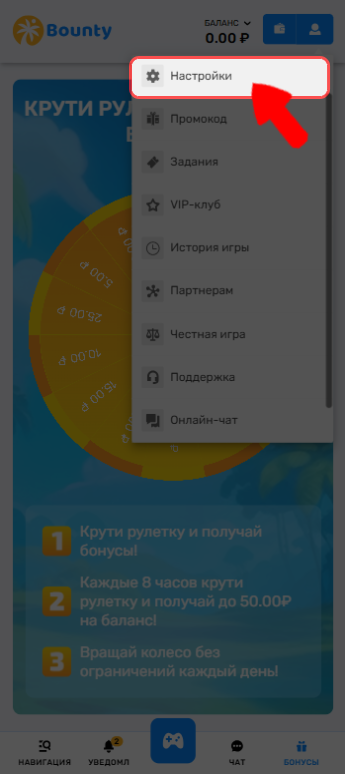
2. Then, go to the "Security" tab.
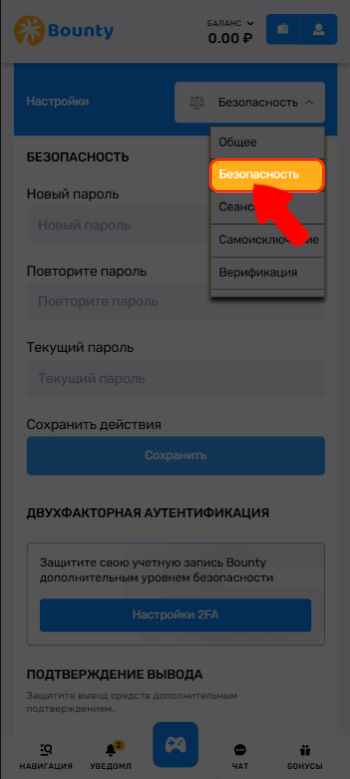
3. Find "Two-Factor Authentication" and click "2FA Settings".
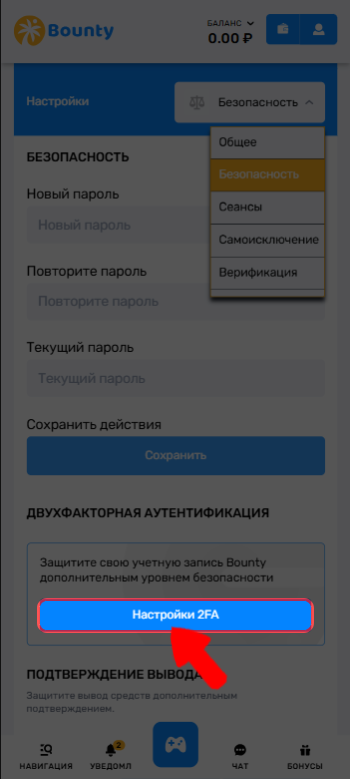
4. You will be given detailed instructions on how to enable this feature. Follow the steps provided to successfully activate 2FA.
Disabling Two-Factor Authentication.
To disable two-factor authentication (2FA) on your account, follow these steps:
1. Go to the "Settings" section of your account.
2. Then, go to the "Security" tab.
3. Find "Two-Factor Authentication" and click "2FA Settings".
4. Enter your account password and the 6-digit code from your authentication app.
To re-enable two-factor authentication, repeat the procedure described in the "Setting Up and Configuring Two-Factor Authentication" section.
🔔If you have forgotten your 2FA login details
Contact our support team and provide the information linked to your account. Our specialists will help you resolve this issue. 🙂
💡 Tip
If you have any questions or need additional information, please feel free to contact our support team.
We're always happy to help!