

🛡️Account security is one of our top priorities. That’s why your profile settings include the “Withdrawal confirmation”.
feature. You can choose your preferred confirmation method—email or Telegram—and change it in your settings at any time.
For additional account protection, go to “Profile → Security” and select “Withdrawal confirmation”.
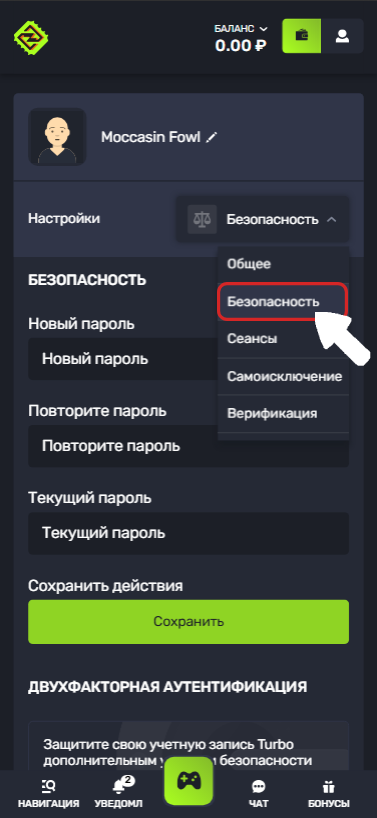
When this feature is enabled, you’ll need to confirm each withdrawal using your selected method.
This protects your account: even if someone gains access to it, they won’t be able to withdraw funds without confirmation.
Which method is selected by default?
If you register with one click or using a username and password, “No confirmation” is selected by default.
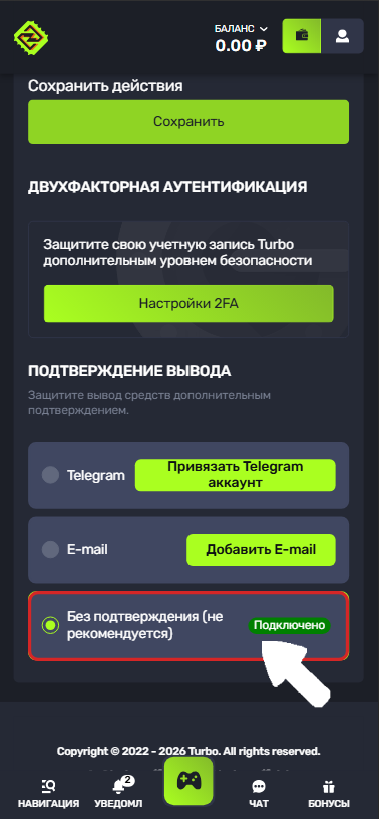
We recommend choosing a more secure confirmation method yourself.
💡If you registered or linked your Telegram account or email address, a suitable confirmation method may be selected automatically.
We still recommend checking your settings to make sure the selected option is the one you prefer. This can help prevent possible withdrawal delays caused by additional verification.
🔃You can change your confirmation method at any time.
📧Email confirmation
If you select Email, a confirmation code will be sent to your email address when you make a withdrawal.
Enter the code you receive in the relevant field to complete the withdrawal.
If you don’t receive the email with your code, follow these recommendations👇
💬Telegram confirmation
If you select Telegram, you can confirm your withdrawal using our bot.
To do this:
Open the Telegram bot.
Request a confirmation code.
Enter the code you receive in the confirmation field on the website.
If an error appears after you enter the code:
reopen your chat with the bot;
make sure the bot isn’t blocked.
This can happen if you previously selected “Log out and block” in Telegram.
🔍Lost access to your confirmation method?
If you can no longer use your email or Telegram, don’t worry.
You can reset your current confirmation method in your security settings and link a new one.
Please note: after resetting your confirmation method, withdrawals will be suspended for 7 days. This additional security measure helps protect your account from unauthorized changes to your settings.
After this period, once you’ve linked a new confirmation method, withdrawals will be available again.
💡 Tip
If you have any questions or need more information, please feel free to contact our support team.
We’re always happy to help!